Tips
Headshots for a Large Team: A Practical Plan for 100+ People
A photo day works until the calendar, a second office and next month's new hires get involved. Here is how to plan headshots for 100 or more people, whichever way you capture them.
 Ben LoBue
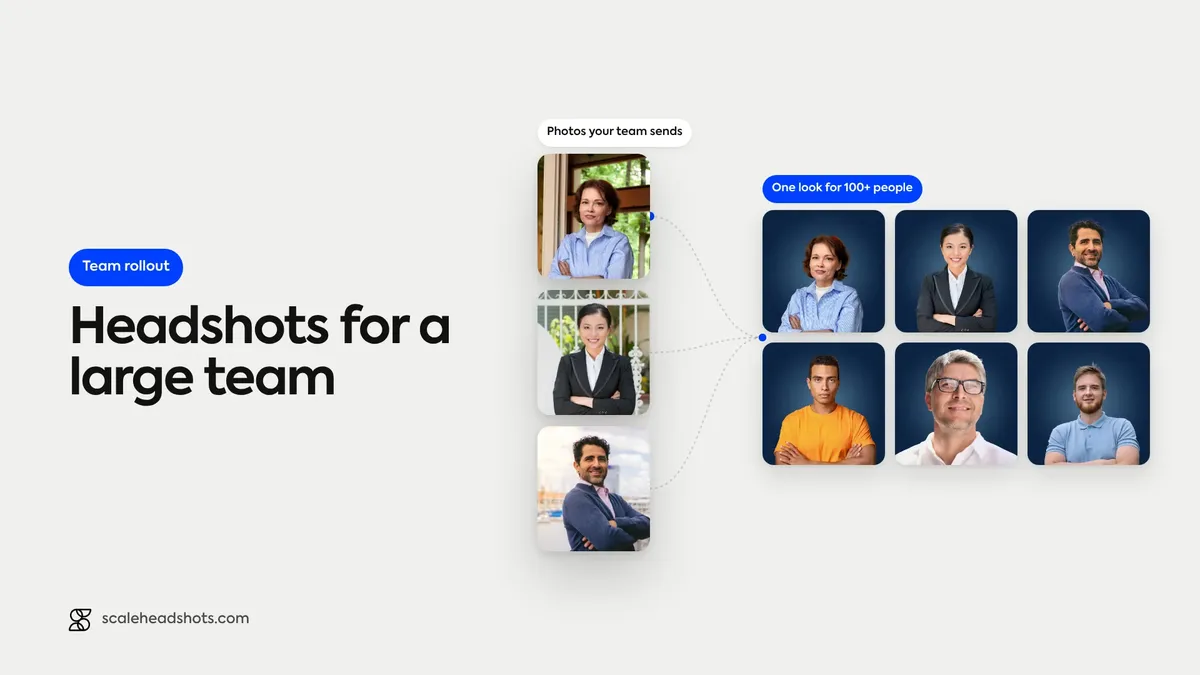
The first hundred headshots are rarely the problem. The last dozen are. Somebody was on leave on photo day. Somebody works from the second office. Three people started the week after the shoot, and the directory now shows two generations of photos on a page that was supposed to look finished.
That's the pattern with a large team. The hard part isn't the camera, it's the coordination: calendars, reminders, make-ups, new hires, and one person (usually in HR, people ops, an office manager or marketing) keeping a spreadsheet of who has sent what. At 20 people that spreadsheet is a nuisance. At 100 or more it's a project.
Below is a plan that holds up whichever way you capture, an office photo day or a phone-based remote capture. It covers how to choose, how to schedule and remind, what to do for the people who miss it and the people hired later, how to keep one look, and who should approve.
How do you get headshots for 100+ people?
Pick one capture method, one look and one owner before you invite anyone. Run an office photo day if most people share a building, or let each person capture on their own phone through a guided link if they don't. Either way, send one dated request, decide up front how absentees and new hires get a photo, and have one person review every submission against the same standard.
Should you run a photo day or collect headshots remotely?
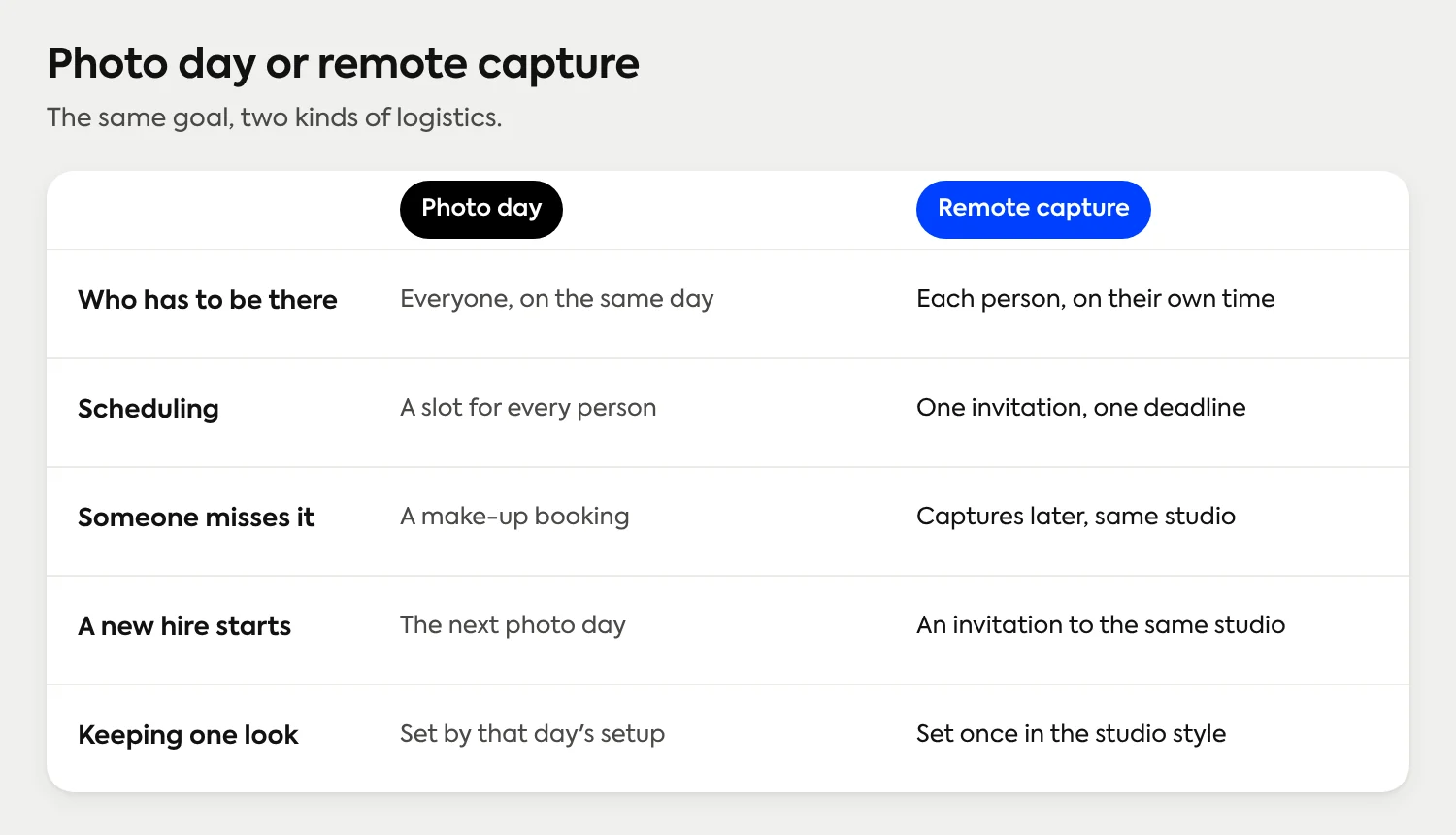
Both work. They fail in different places. A photo day concentrates the work into a day: everyone is in the building, a photographer sets up once, and the schedule does the coordinating. Remote capture spreads the work out: each person takes their own photo on their own time, and the platform does the coordinating.
How to Photograph 100+ Team Headshots in 1 Day
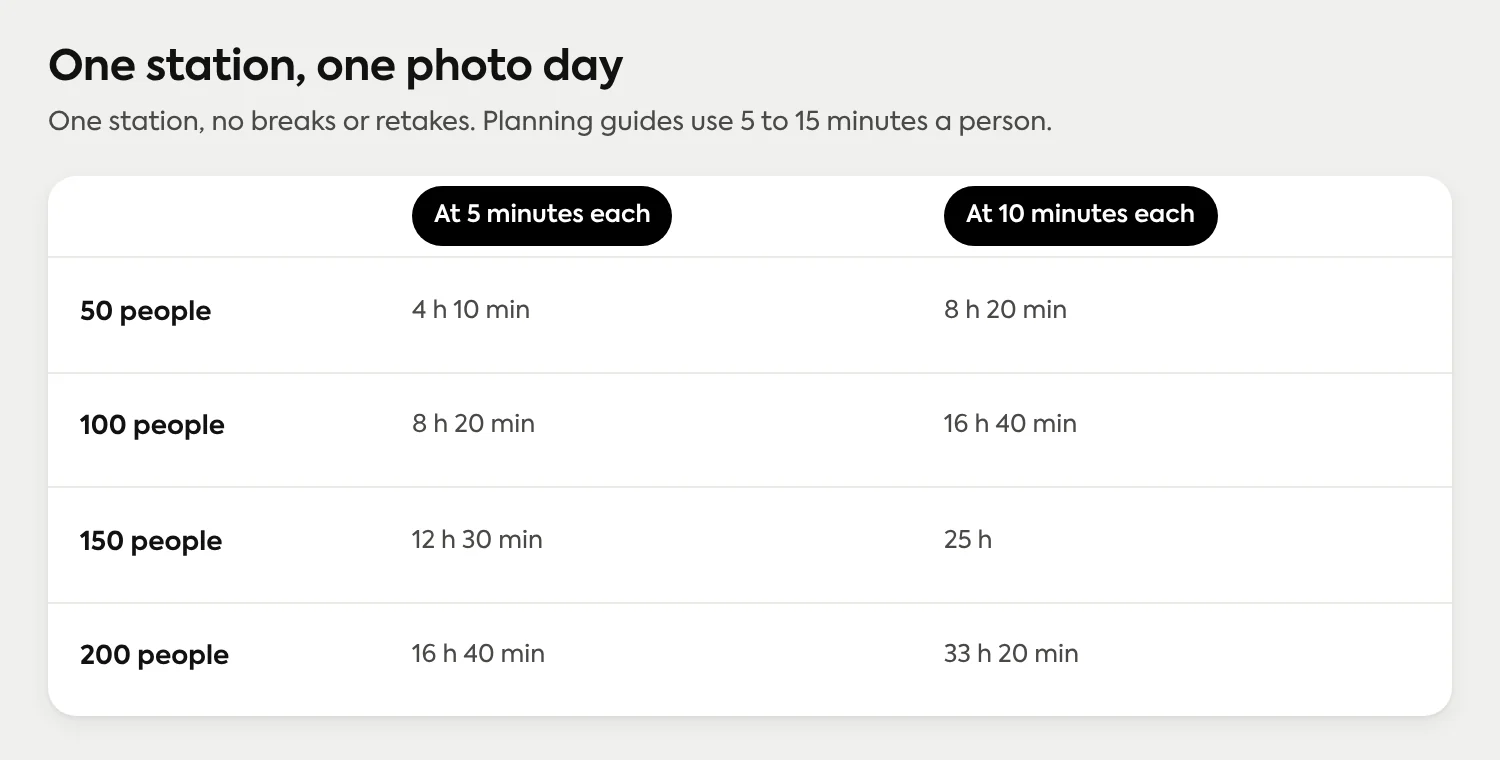
The arithmetic decides it for most companies. At a five-minute slot, one station photographs about twelve people an hour. Published photo-day planning guides use anywhere from five to fifteen minutes a person, so 100 people is a full day or more at one station, before late arrivals, retakes or lunch. Add stations and the day shortens, but you're now staffing and scheduling more of it.
A photo day with a photographer is the right call in a few situations: most of the company shares one building and one date can be found, you want group photos or an event, you want a crafted editorial or brand shoot with a location and styling, or someone wants coaching in the room. If that's you, book it, and use the scheduling advice below either way. How a photographer day compares with a platform, and what to ask before you book is its own article, and the prices are in our guide to what headshots cost.
Remote capture fits when the company doesn't sit in one place, or doesn't stay still:
People are spread across cities, time zones or shifts. Nobody has to be in a particular room on a particular day.
People keep joining. Hiring doesn't pause for a photo calendar, so the process has to be a standing one.
The set has to stay matched. One look, applied to every photo whenever it arrives.
Here's how that works in Scale. The admin uploads the roster and the platform sends each person an invitation email with the company's logo and colors. Each person opens a guided link on their phone, with live lighting feedback and a review-and-retake step before they submit. AI edits the real photo (background, lighting, crop and upscaling), so every headshot is professionally finished automatically. Today, Scale is AI edited, not generated: the photo is the employee, not a synthetic likeness. An admin approves each one or requests a retake, up to four per submission, and the finished headshots go out in every format, plus through the API. The Studio 2 capture experience has the details of the guided step.
How do you schedule and remind 100+ people?
Most missed headshots aren't refusals. They're messages that got buried between a stand-up and a deadline. The fix is boring and it works: one owner, one date, one clear request, and reminders that arrive before the date does.
Name one owner and one deadline. Somebody's name is on the request, and the date is a real one, tied to something (the new website, the directory launch, badge printing).
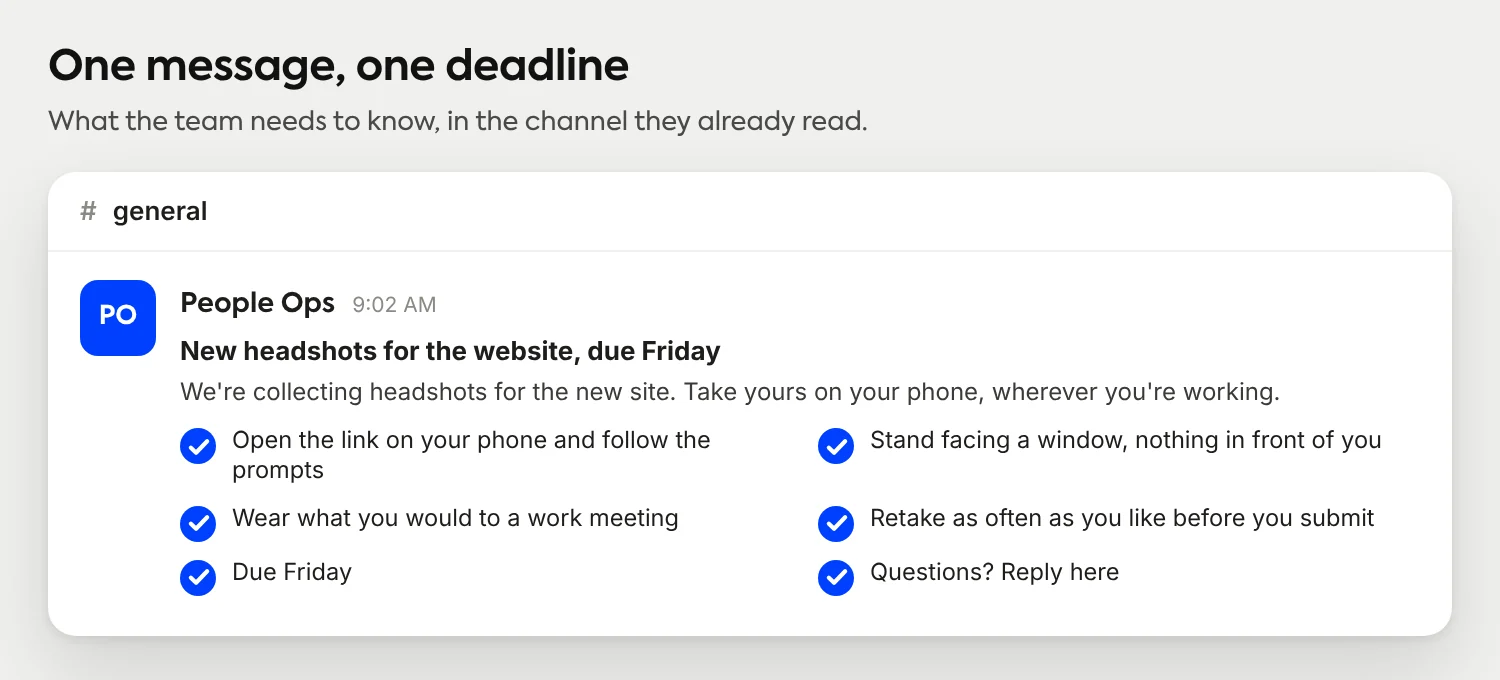
Send one clear request. Say what the photo is for, where it will appear, what to wear (our attire guide is easy to point to) and what happens after they submit. Our paste-ready instruction messages for employees cover the wording.
Start with a small first wave. Ten or fifteen people from different departments will find the rough edges, such as a link that lands in spam, before 100 people do.
Roll out in waves by department or location. Waves keep the review queue manageable and give managers a short list to chase.
Follow up on a schedule. With a photo day, send the exact time, place and attire note about two days ahead. With remote capture, you upload the roster and the platform sends the invitations, so you aren't emailing people one by one. Plan your own follow-up a few days before the deadline.
Managers help more than any tool. Send each department lead the list of people who haven't submitted, with the date. A nudge from their own manager is the one reminder people don't mute. The message itself can stay short:
What about people who were out, and people hired later?
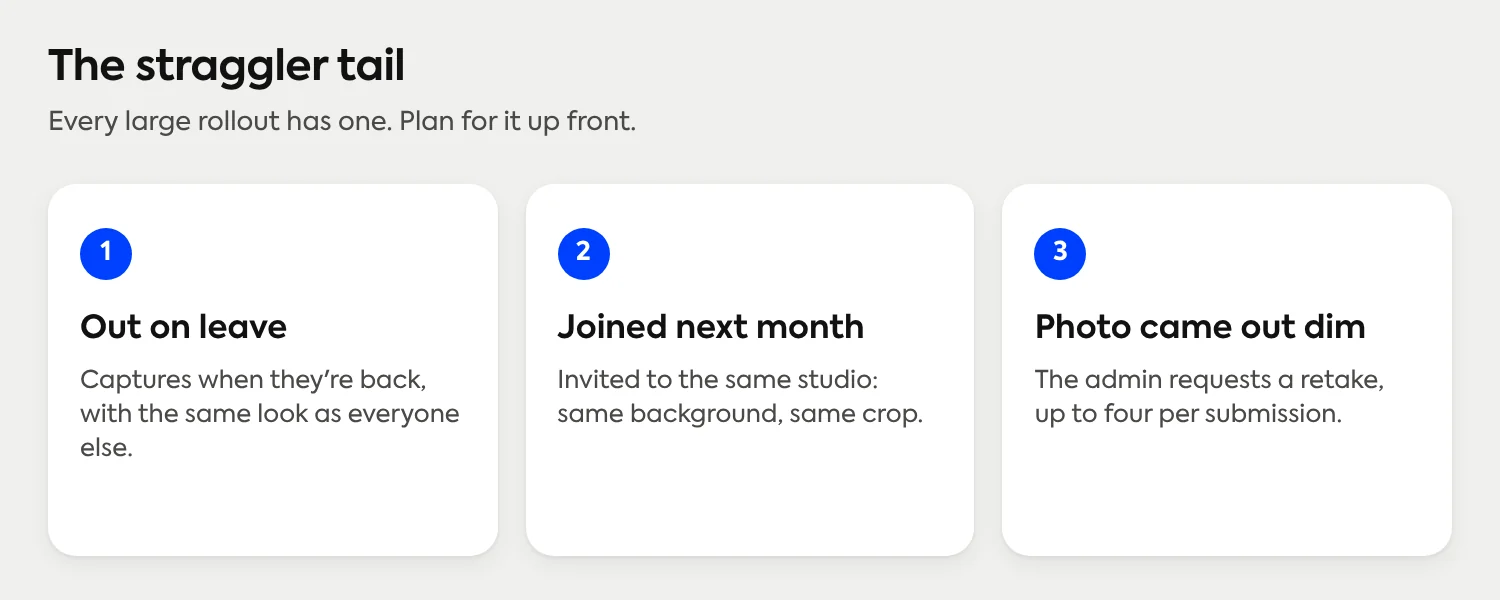
Call it the straggler tail: the last dozen people who couldn't make the day, started after it, or sent a photo that needs a redo. On a photo day, each of them is a new booking. Published planning guides suggest deciding in advance whether absentees get a make-up morning, a quarterly session or a studio appointment, and keeping lighting and crop notes on file so the later shoot matches the first.
Remote capture removes most of the tail, because there's no event to miss. In Scale, studio access runs on credits and retake eligibility rather than start and end dates, so someone back from leave can capture when they return, with the same look as everyone else. Shift-based teams such as clinics and hospitals run into this most, and our guide to medical staff headshots covers how those rollouts run.
Photograph 100 Team Headshots in a Day
New hires are the same problem on a slower clock. Photo days give you two generations of headshots, one before the shoot and one after, unless someone organizes another day. The cleaner pattern is to make the headshot an onboarding step: the new person gets the invitation with their first-week messages, captures on their phone, and the admin approves it like any other. Our walkthrough for distributed companies covers that flow in more depth.
How do you keep one look across 100+ people?
Consistency is decided once, then enforced by process. Write down the few variables that matter (background, lighting, framing, crop and attire guidance) and apply them to every photo, the same way, whenever it arrives. The variables worth writing down are in the standardization guide, so we won't repeat the policy template here. Our editing guide covers where editing ends and retouching begins.
What changes at 100 or more is that you can't enforce a look by being in the room. With a photo day, the setup enforces it for one date. With Scale, the studio's style enforces it for every submission: background, lighting and crop come out matched, and the people capturing only need to bring a clear photo. If you're still choosing a background, our backgrounds guide has the options. A finished set shows what a matched team looks like.
Who should approve 100+ headshots?
Somebody has to look at every photo. The question is who. For the first wave it's usually the admin who owns the project, but at 100 or more people the review queue deserves more than one pair of eyes. Scale offers Owner, Admin, Developer, Approver and Viewer roles, so you can decide who reviews before you invite anyone. See what each role is for.
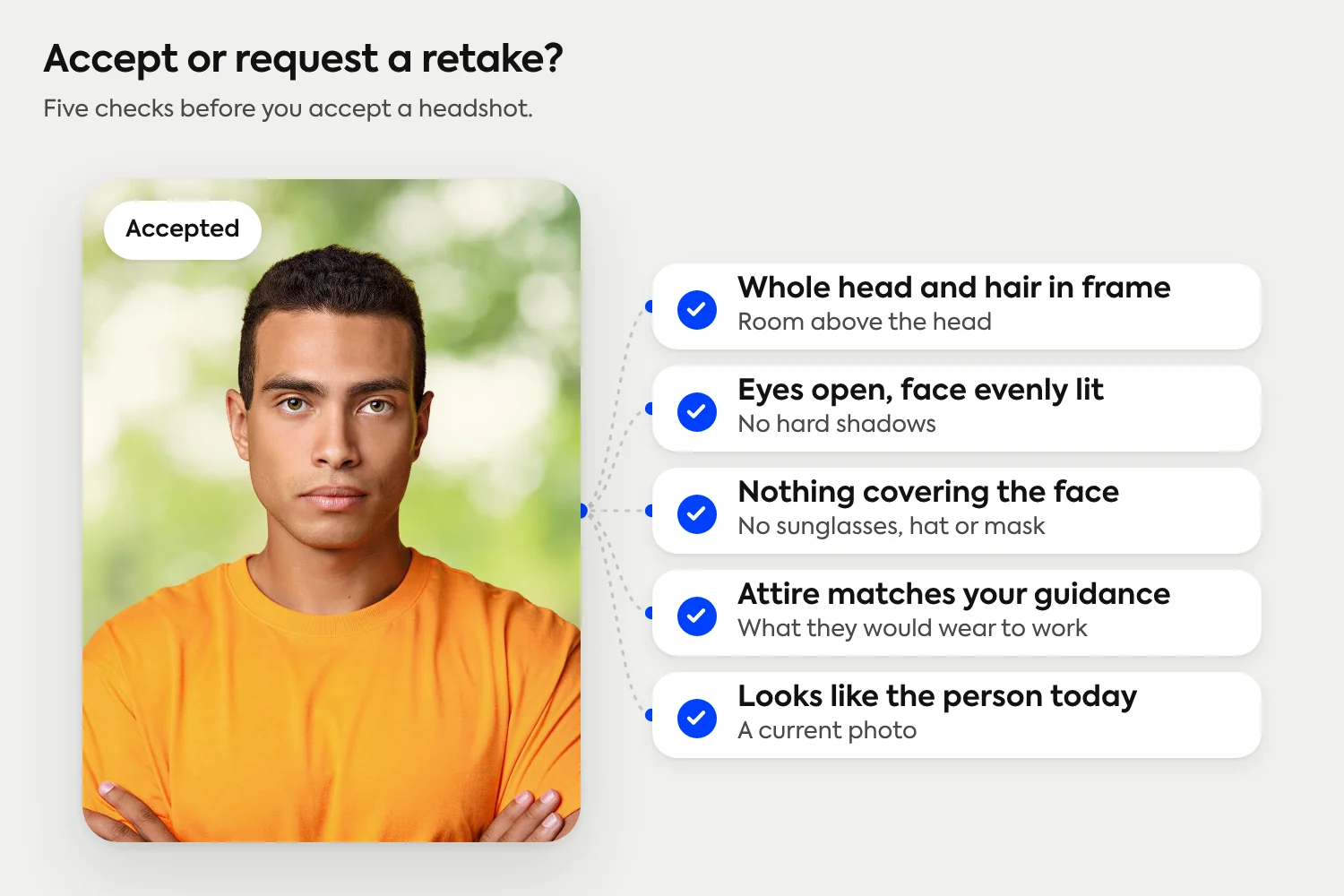
Agree on the standard first, then apply it the same way to every photo. A short test keeps reviewers consistent, and it keeps retakes to the photos that need them. When you request one, tell the person what to change, whether that's the light, the distance or a hat.
What does it cost to get 100+ people photographed?
Setup in Scale is free and credits start at $25 per headshot, so 100 people comes to $2,125 at the published 100-credit rate of $21.25 per headshot. You get 3 free credits on signup, enough for a pilot with a few colleagues before you send the full invitation. There are no subscriptions or contracts, and each submission includes up to four retakes before another credit is deducted. For what a photographer day costs, see our cost guide.
Rolling this out to a whole company?
Setup is free and every employee captures on their own phone. See how invitations, review and delivery work for a whole company.
See how a rollout worksFrequently Asked Questions
How long does it take to photograph 100 employees?
At one station and five to ten minutes a person, 100 people takes roughly 8 to 17 hours of shooting, so plan on more than one day or more than one station. With remote capture, people take their own photos in parallel, so the timeline depends on how quickly people respond to your request.
Should a company with 100 employees hire a photographer or use a platform?
Hire a photographer if most people share one building, you can find one date, or you want group photos, an event or a crafted brand shoot. Use a platform if people are spread out, hiring continues, or the set has to stay matched over time.
How do you get headshots for people who were out on photo day?
With a photo day, plan a make-up session or a later booking before the first day. With remote capture, the person captures on their phone when they return, because studio access has no start or end dates, and the photo gets the same look as everyone else.
How do new hires get a headshot after the team shoot?
Make it an onboarding step. The new hire gets the same capture invitation in their first week, and an admin reviews the photo like any other, so it matches the existing set instead of waiting for the next photo day.
How do you keep headshots consistent across a large team?
Decide the background, lighting, crop and attire guidance once, then apply them to every photo the same way. Scale applies the studio's style to every submission, so photos taken in different places come out matched.
Who should approve employee headshots?
One person owns the project, and for 100 or more people it helps to share review with one or two others. Agree on a short standard first, then approve each photo or request a retake with a note on what to change.
How much do headshots cost for 100 employees?
In Scale, setup is free and credits start at $25 per headshot, so 100 people comes to $2,125 at the published 100-credit rate of $21.25 per headshot. There are no subscriptions or contracts.
Still have questions? Get in touch and we'll be happy to help!
Get 100+ people photographed without a second photo day
Setup is free, every employee captures on their own phone, and an admin approves or requests a retake on each headshot. Real photos, AI edited, not generated. Credits start at $25 per headshot, with no subscriptions or contracts.