Tips
How to Standardize Corporate Headshots Across Global Teams
Mismatched headshots read as disorganization. The fix is operational, not photographic: six variables, one policy, one capture workflow. Here is the standard and the rollout.
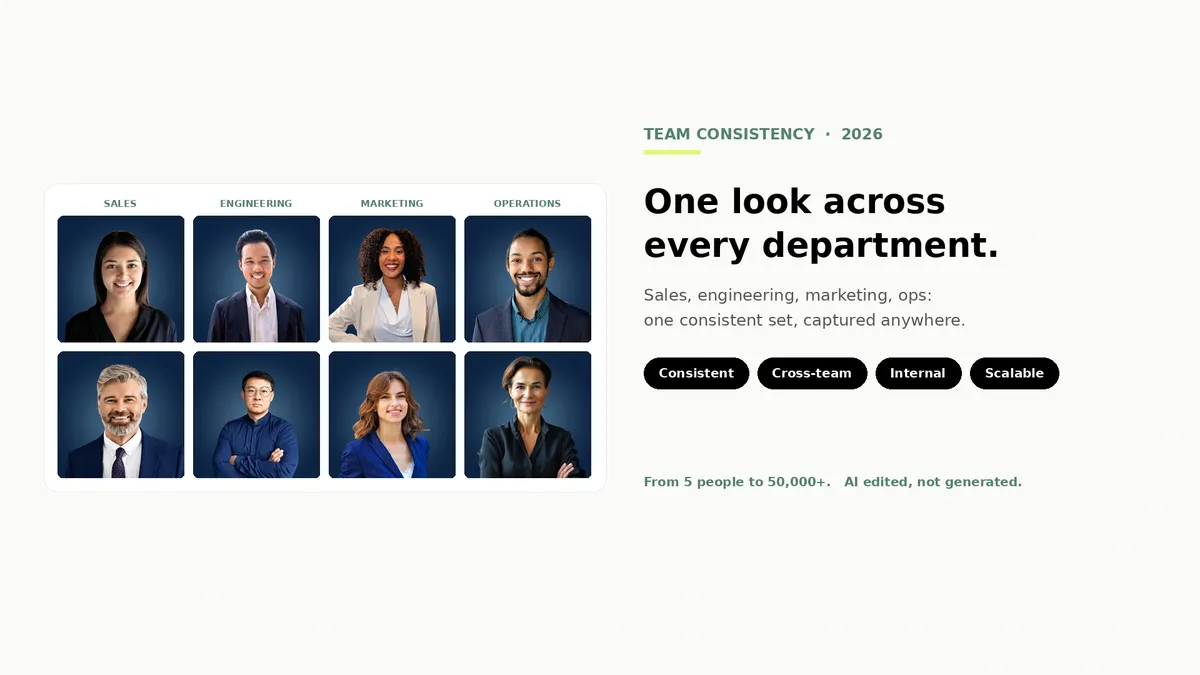
Pull up your company directory and look at the headshots as a set, not one at a time. If they came from different photographers, in different offices, across a few years of hiring, the mismatch is doing quiet damage: a gray studio backdrop next to office-window bokeh, warm color next to cool, a tight crop next to a waist-up frame. Each photo might be fine on its own. Together, they read as disorganization.
Standardizing corporate headshots is not a photography problem. It is an operations problem: six visual variables and one capture workflow, held constant across every office, every time zone, and every new hire who joins after the big photo day. This guide gives you the standard to set, a policy you can copy, and a rollout that holds up after launch.
How do you standardize corporate headshots across a global team?
Fix six variables in writing (background, lighting, framing, expression, attire, and editing), then run every employee through the same capture workflow instead of booking a different photographer per office. A self-service platform with centralized editing and a review gate holds the standard automatically, including for new hires in any time zone.
Why headshot consistency breaks at scale
A single photographer shooting a single session produces consistent photos. That consistency does not survive scale, and it fails in three predictable ways.
Different vendors, different styles. Every photographer has a signature: their backdrop, their lighting setup, their retouching taste. Book one in Austin, one in Berlin, and one in Manila, and you have commissioned three different brand identities. Even detailed shot lists only narrow the gap; they never close it.
Cohorts photographed months apart. Hybrid teams rarely get photographed together. Office staff get the spring session, remote hires get a rushed follow-up, and the next acquisition brings fifty photos from a vendor nobody vetted. Photos taken by the same company can still drift when they are taken at different times under different conditions.
Headcount growth. Every new hire arrives after photo day. If the only way to match the set is to wait for the next annual session, your directory spends most of the year with empty tiles and phone selfies. The standard has to work for one person on a Tuesday, not just eighty people on a scheduled morning.

The six variables to standardize
Visual consistency comes down to six variables. Write down a decision for each one and you have the core of your standard.
1. Background. One background, specified exactly: a color, a texture, or a defined office-blur style. This is the variable people notice first when it drifts.
2. Lighting. Soft, even, front-facing light with a consistent direction and temperature. Mixed lighting is the main reason two photos of the same person look like different brands.
3. Framing and crop. Define the crop point (chest-up is the common standard), the headroom, and the aspect ratios you deliver. A directory only looks uniform when every face sits at the same size in the frame.
4. Expression and pose. Set a range, not a mandate: relaxed, approachable, eyes to camera, shoulders slightly angled. The goal is a family resemblance across the set, with room for people to look like themselves.
5. Attire. Match the dress code to your culture and industry, and say it plainly (solid colors, no large logos, business casual). Industry norms differ enough that this line should be deliberate.
6. Editing and retouching. One editing pipeline with one taste level: color correction and cleanup, natural skin texture, no face-altering effects. Editing drift is invisible per photo and obvious across fifty.

A copy-ready employee headshot policy
A standard nobody wrote down is a suggestion. Copy this into your brand wiki or HR handbook, fill in the specifics, and you have an employee headshot policy that answers the questions before they reach you.
Purpose: Employee headshots appear in our directory, on LinkedIn, in email signatures, and on our website. A consistent set presents one brand to customers and candidates.
Scope: All employees with a public or internal profile. Contractors included where they appear on client-facing surfaces.
Visual standard: [Background]. [Lighting]. Chest-up crop with eyes in the upper third. Relaxed, approachable expression. [Attire line]. Centralized editing; no personal filters or AI-generated portraits.
Capture: Headshots are captured through [workflow/platform] using the guided link sent by [owner]. No self-sourced photos.
Review: Every photo passes a review against this standard before it appears anywhere. Photos that miss the standard get a retake link, not a rejection email.
New hires: Capture within the first two weeks, as part of onboarding.
Refresh: Every two to three years, after a significant change in appearance, or on request.
Departures: Photos are removed from public surfaces at exit and retained or deleted per our data policy.
Accommodations: Religious, medical, and personal accommodations are handled by [owner], no questions required.
Owner: [Name/role] owns this policy, the review queue, and the refresh calendar.
Rolling it out across offices and time zones: 5 steps
Step 1: Publish the standard first. Share the policy and a few example photos before anyone captures anything. People show up better prepared when they know what the end result looks like, and you avoid re-litigating the standard one photo at a time.
Step 2: Pick a capture workflow that does not depend on geography. This is the decision that makes or breaks a global rollout. Flying photographers between offices multiplies cost and calendar time with every location; a self-service capture flow that runs on each employee's phone works the same in every time zone on day one. Whatever you choose, it must produce the same output for the person in the office and the person twelve hours away.
Step 3: Launch in cohorts with a real deadline. Roll out by team or region with a two-week window each, announced by a leader rather than a ticket. Cohorts give you volume for the review process without a thousand stragglers, and deadlines convert intent into photos.
Step 4: Route every photo through one review gate. Consistency dies at the edges: the one photo that skipped review is always the one that ends up on the About page. Whoever owns the policy approves every photo against the standard, with retakes as a normal part of the flow.
Step 5: Wire it into onboarding and offboarding. New hires get a capture link in their first-week checklist so the set never decays. Departures trigger removal from public surfaces. Skip this step and your standardization project has a shelf life of about six months.
Setting the attire and style line for your industry
What reads as polished in a law firm reads as stiff in a startup. Our industry guides break down attire, backgrounds, and expression norms by field, with real examples you can lift straight into your policy.
See the industry guidesKeeping the standard after launch
The rollout is the easy half. Standards decay through growth, turnover, and neglect, so the maintenance loop matters more than the launch.
Give it an owner. One named person owns the policy, the review queue, and the calendar. Shared ownership is how directories drift back to chaos.
Measure directory coverage. Once a quarter, count the percentage of profiles with a compliant photo. It is a five-minute audit and the single number that tells you whether the system is working. Healthy programs sit above 95 percent.
Handle misses with retakes, not enforcement. When a photo falls short of the standard, send a fresh capture link with a specific note. Treating it as a quick redo keeps goodwill; treating it as a compliance violation creates the camera-shy resistance you were trying to avoid.
Retire stale photos. Refresh on a two-to-three-year cadence and remove departed employees from public surfaces promptly. An outdated set undermines the exact trust signal you built the standard for. Teams coordinating this across departments can borrow the playbook in our cross-department consistency guide.
The consistency engine: one workflow for every office
Everything above gets dramatically easier when the capture workflow is the same tool everywhere. That is the problem Scale is built for. Every employee gets a guided capture link that runs on their phone: same framing guide, same instructions, same flow in Austin, Berlin, or Manila. There is no photographer to schedule and no time zone math.
The finishing is centralized, which is what actually holds the visual standard. Every photo comes back with the same background, balanced light and color, and the same crop, delivered in every format you use: directory tile, LinkedIn square, email-signature crop, transparent PNG for badges. Photos that miss the standard get caught by active moderation and turned into retake requests before they ever reach your directory.
And it is AI edited, not generated. Scale improves the real photo your employee captured: it does not invent a synthetic face, swap in clothing that was never there, or produce a portrait that drifts from how someone actually looks. For a brand standard, that distinction is the whole point.
New hires slot into the same flow: send a credit, the photo arrives matching the set, the standard survives growth. Credits start at $25, never expire, and volume pricing means you save as you scale. See how teams run it or the full breakdown on pricing.
Frequently Asked Questions
What is an employee headshot policy?
An employee headshot policy is a short written standard that defines how staff photos are captured and used: the visual requirements (background, lighting, crop, expression, attire, editing), the capture workflow, who reviews photos, when they get refreshed, and what happens to photos when someone leaves. Its job is to keep every headshot consistent so the company presents one brand across directories, LinkedIn, and its website.
Can a company require professional headshots?
Generally yes, as a standard business practice, the same way a company sets a dress code. The policy should include a clear accommodations path for religious, medical, and personal circumstances, handled privately by the policy owner. Employment law varies by region, so run the final policy past counsel rather than treating this as legal advice.
How do you keep bulk retouching consistent across a large team?
Put every photo through one editing pipeline with one defined taste level, rather than letting each photographer or employee edit their own. Centralized, automated enhancement applies identical background, color, and cropping treatment to every photo, which is how a set of hundreds stays uniform. Editing drift is invisible in a single photo and obvious across a directory.
How do remote and global teams get matching headshots?
Use the same self-service capture workflow everywhere instead of booking photographers per location. Each employee captures a photo on their phone through a guided flow, and centralized editing brings every photo to the same background, light, and crop. This removes scheduling, travel, and time zone constraints, and it produces a more consistent set than coordinating multiple photographers.
What does it cost to standardize headshots for a large team?
Traditional in-person sessions typically run $150 to $500 per person, plus travel and coordination for every office, and the cost repeats for each new hire. A self-service platform like Scale starts at $25 per headshot credit, credits never expire, and volume pricing brings the per-person cost down as the team grows, so new hires cost one credit instead of one photographer visit.
How often should a company refresh employee headshots?
Every two to three years is the working standard, plus event-driven refreshes: a rebrand, a significant change in someone's appearance, or an employee request. A consistent capture workflow makes refreshes cheap enough to run on a rolling basis instead of as a disruptive all-company photo day.
What happens to employee headshots when someone leaves?
Remove the photo from public surfaces (website, directory, marketing materials) promptly at exit, and retain or delete the file according to your data retention policy. Employee photos are personal data under privacy regimes like GDPR, so the policy should name where photos are stored, who can access them, and when they get deleted.
Still have questions? Get in touch and we'll be happy to help!
Hold the standard without holding a photo shoot
Scale gives every employee the same guided capture on their phone and returns one consistent set: same background, same light, same crop, reviewed before it reaches your directory. Real photos, AI edited, not generated. Credits start at $25 and never expire, and you can try it with three free credits.