Product Update
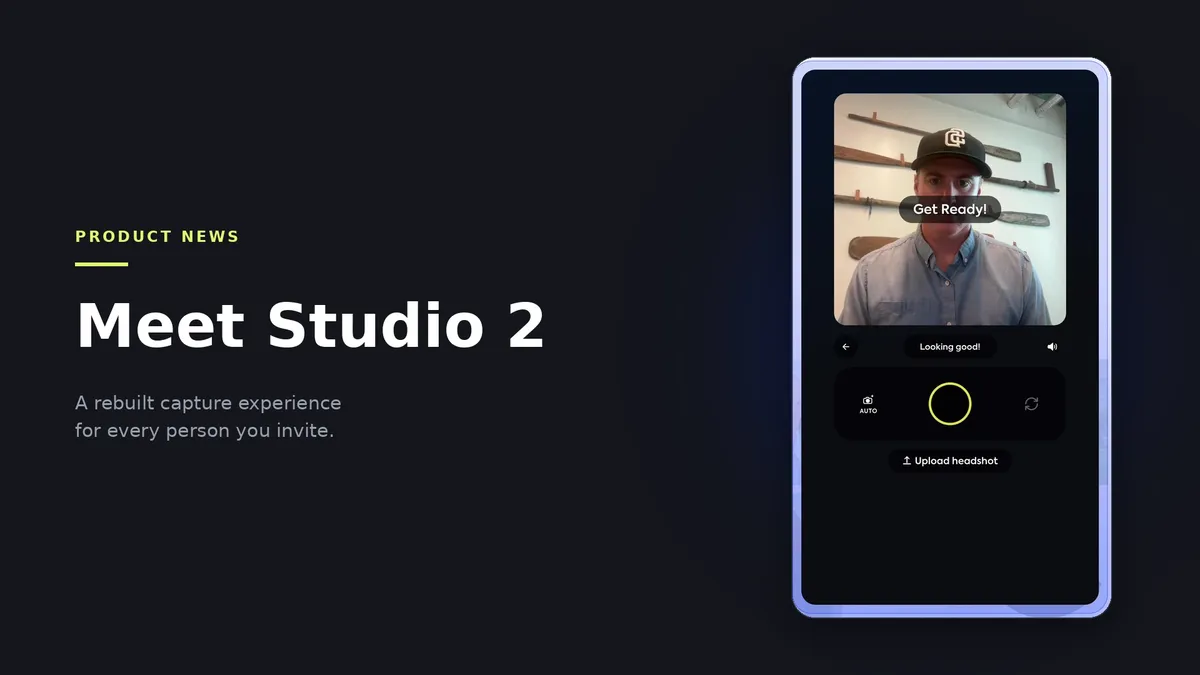
Meet Studio 2
Studio 2 is the first substantial rework of the Scale capture experience, bringing real-time guidance, automatic capture, and lighting validation into every session.
Scale Headshots automates the collection, approval, and distribution of employee headshots at scale, for companies that would otherwise be coordinating photographers, studios, and calendars across every office they operate.
Today we're releasing Studio 2, the most significant update to the employee capture experience since the platform launched. Real-time guidance, automatic capture, and lighting validation now run inside every session, so each person you invite is guided to a professional result on their first attempt.
Capture is the highest-leverage moment in a headshot program. Studio 2 makes it the easiest one.
What is Studio 2?
Studio 2 is the rebuilt capture experience in Scale Headshots, the interface each employee uses to take their own headshot. It provides live framing and positioning guidance, releases the shutter automatically once the subject is correctly framed, and validates lighting on the captured image before it is submitted. Studios enable it from the Dashboard.
What's new in Studio 2
A shorter path to a submission
A redesigned interface and a reduced number of steps between the invitation and a finished submission.
Real-time capture guidance
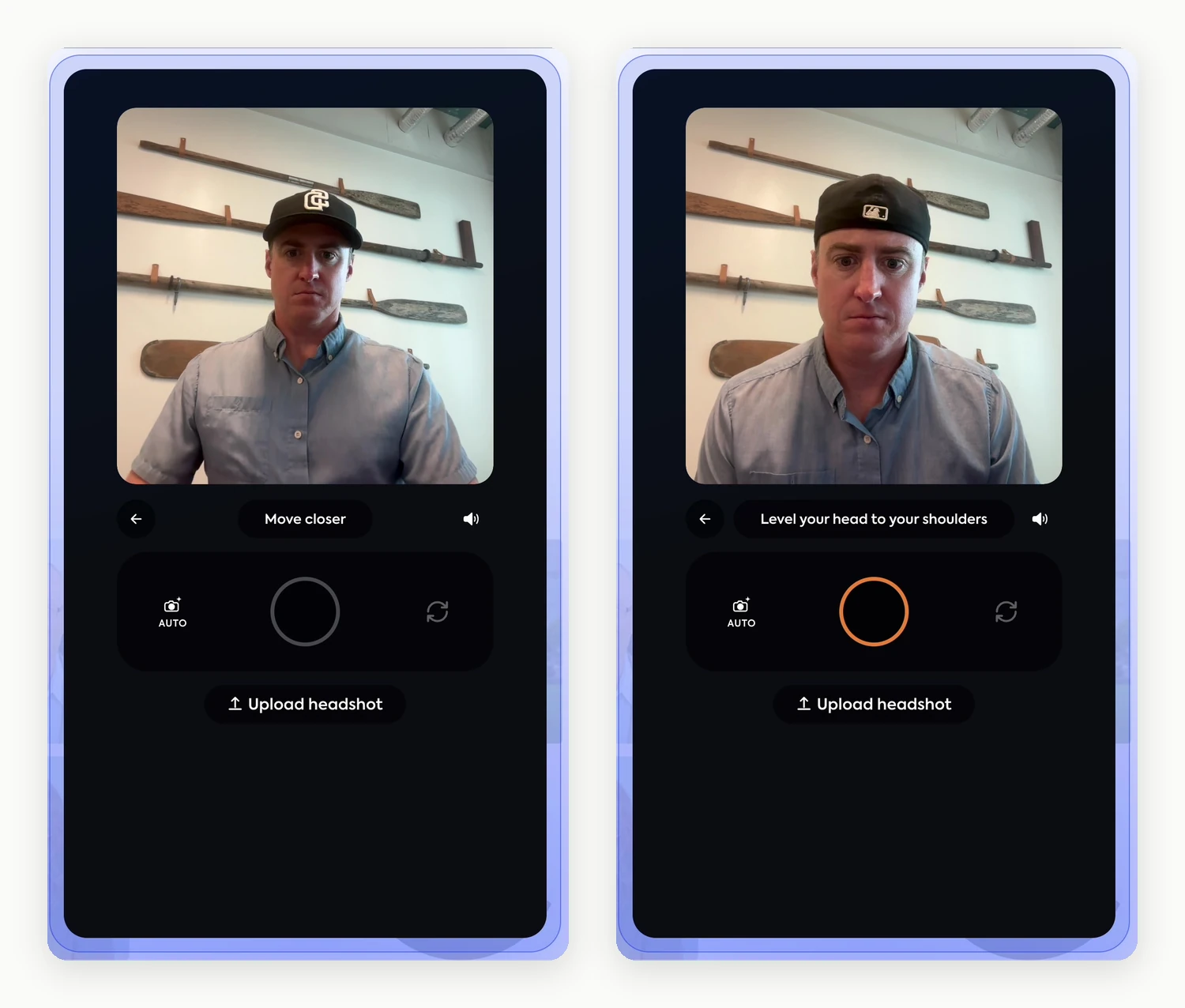
Live framing, distance, and alignment feedback while the session is open, with automatic shutter release once the framing is correct.
Automatic photo editing
Rotation, zoom, cropping, and background removal applied automatically after submission.
Designed around the person taking the photo
Every headshot program comes down to a single moment: an employee, their own device, and a few seconds to get the shot right. Most people are not photographers, most are doing this alone, and most have no way to judge their own result while they are standing in front of the camera.
Studio 2 brings that judgment into the session. It reads the frame while the person adjusts, tells them what to change in plain language, and releases the shutter itself once everything is correct. Camera anxiety, the thing that makes people rush and submit the first frame they get, stops being a factor when the software is confirming the result as they go.
For the administrator, that changes what arrives in the approval queue. More submissions are usable on the first pass, which means fewer retake requests, fewer reminders, and a program that finishes on schedule.
Real-time capture guidance
Studio 2 evaluates the frame continuously while a session is open. It reports distance, head position, and alignment in plain language as the subject adjusts, then arms and releases the shutter automatically once the framing is correct.
Automatic release matters more than it appears. Reaching for a shutter control at arm's length introduces movement and tends to produce a photograph of someone reaching for a shutter control. Removing that action from the employee removes a predictable source of unusable submissions.

Guidance is written in plain language rather than photographic terminology. Nobody is asked to adjust a focal length.
Try it on your own studio
Studio 2 is available on every account today. Enable it from the Dashboard and send yourself an invitation to see the capture experience your team will receive.
Lighting validation before submission
Framing guidance addresses composition. It does not address light, and backlighting remains the most common cause of an unusable corporate headshot. A room that appears well lit to the person standing in it will routinely render their face in shadow on camera.
Studio 2 evaluates the captured image before it enters the approval queue. When the lighting fails, it reports the cause and offers an immediate retake.

This is a deliberate trade. Most capture interfaces are built to make submission as easy as possible, and Studio 2 will decline a photograph and explain why. A correction that costs the employee fifteen seconds is materially cheaper than a rejection that costs an administrator a full follow-up cycle.
Correction inside the same session
The sequence below is one uninterrupted session: a failed lighting check, a retake, framing guidance, and an accepted result.

The correction happens while the employee still has the device in their hand. Nothing routes back to an administrator, and nothing waits on a reminder. On acceptance the employee confirms and the session closes. There is no account to create, no application to install, and no file to name or send.
What reaches the administrator

A single submission arrives rendered in every style the studio has configured, ready to approve or return for a retake from one screen.
One photo, many outputs. That has been the architecture of the platform from the beginning. Studio 2 raises the quality of what enters it.
AI edited, not generated
Employee headshots carry a requirement that consumer headshot tools do not. They have to be accurate to the person. These images are printed on badges, attached to email signatures, and published on team pages, and they are used to identify people.
Today, Scale is AI edited, not generated. Every headshot originates as a real photograph taken by the person in it. AI performs background removal, lighting and color correction, framing, and upscaling. It does not synthesize a likeness, and it does not alter a face.
The three images below come from the capture shown above. Framing, expression, and clothing are identical across all three. The background and the lighting are what changed.
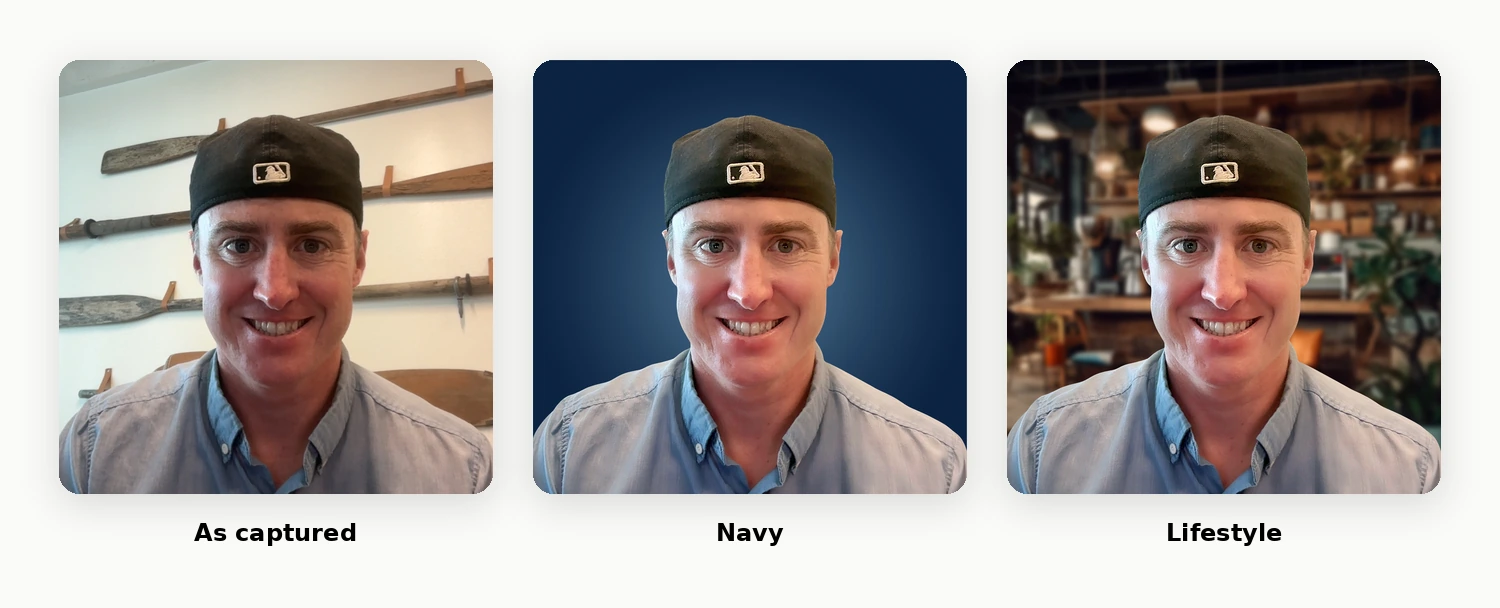
Dress the way you want to be seen
Scale does not change what someone is wearing or how they look. A photograph submitted in a polo comes back as a headshot in a polo. AI improves the photograph, never the person in it.
Real-time analysis, running in the browser
Studio 2 evaluates the live camera stream on the employee's own device while the session is open, then runs a separate evaluation on the captured image before it is submitted. Both happen in a browser tab, on whatever phone or laptop the person already has.
- Web-first by design. No native application to install and no device management required.
- Live analysis of the camera stream for distance, head position, and alignment.
- A separate evaluation pass on the captured image, covering lighting and framing.
- Automatic shutter release once the framing rules are satisfied, with manual capture always available.
- Camera compatibility verified before a session begins.

Reliability across devices
Several improvements in this release are there to protect the session itself. Studio 2 verifies camera compatibility before a session begins. It applies consistent framing across devices, so submissions from a five-year-old Android and a current iPhone arrive in the same aspect ratio. It includes accessibility support.
Individually these are small. Together they keep sessions moving on whatever device an employee happens to pick up.
Ready to move your studios across?
Studios, contacts, branding, styles, and credit balances carry across unchanged, and enabling Studio 2 adds five credits to your account.
Enabling Studio 2
Studio 2 is opt-in and available now. From the Dashboard, select Try Studio 2 to review a side-by-side comparison of both experiences before enabling anything. No existing studio changes until you choose to switch it.
Studios, contacts, branding, styles, and credit balances all carry across unchanged. Enabling Studio 2 adds five credits to your account.
Studio 2, answered
What is Studio 2?
Studio 2 is the rebuilt capture experience in Scale Headshots, the interface each employee uses to take their own headshot. It provides live framing guidance, releases the shutter automatically once the subject is correctly framed, and validates lighting on the captured image before submission. Studios enable it from the Dashboard.
Do we have to move to Studio 2?
No. Studio 2 is opt-in. Existing studios continue to operate exactly as configured until an administrator chooses to enable it. The Dashboard presents a side-by-side comparison of both experiences before anything changes.
What happens to our studios, contacts, and credits when we enable it?
Everything carries across unchanged: studios, contacts, branding, styles, and credit balances. Enabling Studio 2 also adds five credits to the account.
What happens when an employee's photo fails the lighting check?
Studio 2 reports the cause in plain language and offers an immediate retake in the same session. Most lighting failures are caused by a window or lamp positioned behind the subject, and turning to face the light source resolves them. Each credit covers up to four retakes, so correcting a photograph in the moment does not consume an additional credit.
Which devices does Studio 2 support?
Studio 2 runs in the browser, so there is no application to install. It verifies camera compatibility before a session begins and reports the issue if a device is unsupported, rather than failing partway through. Framing is applied consistently across devices.
Does Scale generate headshots with AI?
No. Today, Scale is AI edited, not generated. Every headshot originates as a real photograph taken by the person in it. AI performs background removal, lighting and color correction, framing, and upscaling. It does not synthesize a likeness and it does not alter a face.
Still have questions? Get in touch and we'll be happy to help!
Enable Studio 2 from your Dashboard
Studio 2 is available on every studio today. Enable it, send yourself an invitation, and review the capture experience your team will see.